Turn Your Newsletter Into Endless Social Media Posts
Flyletter's Publicist reads your finished newsletter and writes value posts and a three-post promo campaign for LinkedIn, X, Threads, and Substack Notes.

8 min read
Most creators write a newsletter, hit send, and let it die in the inbox.
That newsletter took you hours. Inside it are eight, ten, twelve ideas strong enough to stand on their own, and each one could be a post on LinkedIn or X or Threads that earns you readers who never would have found the email. Instead the whole thing gets one read (maybe) and then it's gone.
Flyletter's Publicist fixes that. It reads your finished issue, pulls out the ideas worth repeating, and writes posts for each platform individually. It also writes a three-post campaign to promote the issue itself, timed around your send date.
This article covers how the Publicist works, then how to run it. The first half is the system. The second half is the clicks.
The Publicist Writes for Each Platform
The Publicist writes posts natively for four platforms: LinkedIn, X, Threads, and Substack Notes. Each one gets its own register, its own length, and its own format rules.
That matters because a LinkedIn post and an X post are different objects. One rewards structure and room to develop a point. The other rewards compression. A post that works on Threads is conversational in a way that reads wrong on LinkedIn. Write one post and paste it everywhere and it fits nowhere.
So the Publicist writes each platform's posts as if that platform were the only one. And it writes two kinds of posts, because two jobs need doing.
Two Kinds of Posts, Two Different Jobs
Every issue produces value posts and promotion posts. They look similar in the tab. They do opposite work.
- Value posts give away an idea from the issue. A reader who never opens the newsletter still gets something complete. They carry no links.
- Promotion posts promote the issue itself. They carry the link, and they run on a schedule around the send.
Why no link on value posts? Because a post whose job is to earn reach and trust should not spend that reach on a CTA. Value posts build the audience. Promotion posts convert it. Keeping those two jobs separate is a design decision, and it's the whole point of the system.
How Value Posts Get Written
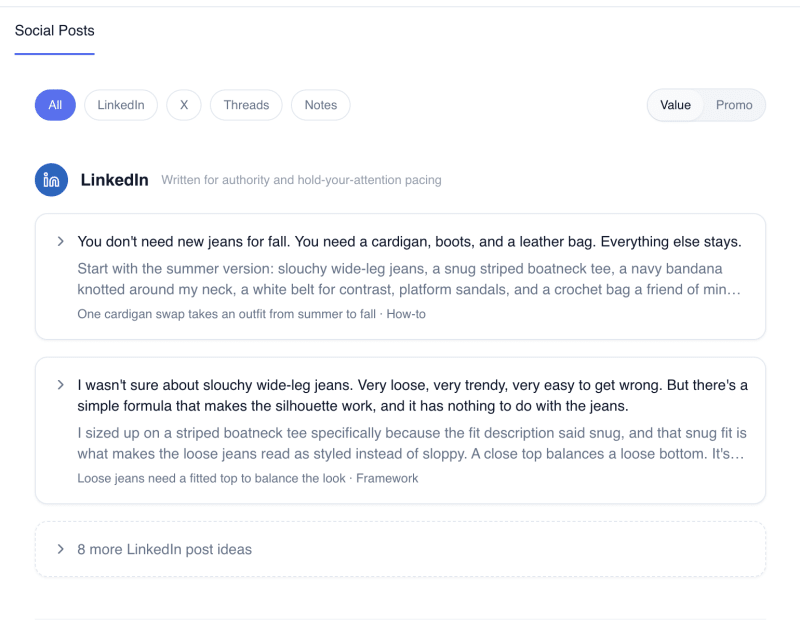
The Publicist reads your finished issue and pulls out 8 to 12 discrete ideas. Each one is something that stands alone: an insight, a story, a framework, a statistic, a method, an observation. These are pieces of the issue, never a summary of it.
Each idea gets tagged with the rhetorical shape it naturally holds in your writing (contrarian, story, framework, stat, how-to, relatable) and then routed to the platforms it actually suits. The routing is real. A how-to never goes to Threads, because instructional content does not fit that platform. An idea that needs room to breathe does not go to X. Most ideas suit one to three platforms. All four is rare.
Ideas are ranked, and the Publicist writes the top two per platform automatically. Every remaining idea routed to that platform sits below, unwritten, one click from done. Ideas are never consumed. Writing one for LinkedIn leaves it available for X, where it will be written differently because X is a different room.
Every post comes with three alternative hooks. A hook is the opening only, so swapping one changes how the post starts and leaves the body alone. The three take different doors into the same idea (a moment, a claim, a number, a question). If none of them land, a refresh control writes more.
And if the Publicist missed something you wanted to say, type your own idea into the composer and it writes that as a post for the platform you're in.
How Promotion Posts Get Written
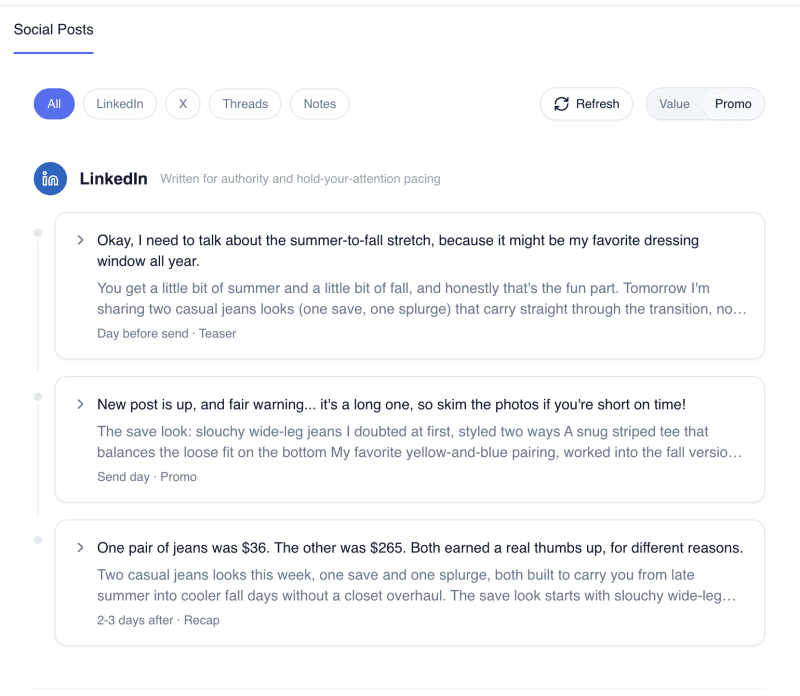
Promotion posts come as a three-post campaign per platform, per issue, built around your send date.
- Teaser (day before). Announces tomorrow's issue. It reveals the topic and the promise and nothing else, so no findings, numbers, or story outcomes.
- Promo (send day). The issue is out. This post either reveals one compelling specific from inside it, or lists what's inside without paying any of it off, whichever fits the issue.
- Recap (two to three days after). A standalone post that delivers most of the issue's value while deliberately holding back two or three specifics a reader would feel the absence of.
The interesting part is that the three posts know about each other. The teaser cannot reveal what the recap is holding back. The promo's one specific is never one of the withheld items. The recap names what it's withholding, so the reader knows there's more behind the link. The system enforces this coordination in code.
The recap is written once, as a sequence of segments, then assembled per platform. On LinkedIn and Notes it's a single post. On X and Threads it's a thread, breaking between segments so nobody lands mid-thought.
The system places every link. On thread platforms the link never appears in the first post, because the first post is where reach gets decided. On single-post platforms it closes the post. The link itself comes from your connected content source. The article slug is a placeholder you fill with one tap once the issue is live, since the URL doesn't exist yet when the posts are written.
We didn't invent this cadence. Newsletter operators like Tyler Denk have run teaser, announce, recap in public for years. The Publicist builds it for you, per platform, every issue.
The Voice Layer and the Quality Floor
Every post is written through your brand profile, the same one the newsletter pipeline reads, adapted for short form. The Publicist works from how you actually write, which is why the posts sound like you.
Every post is also checked in code before you ever see it. The check screens for the patterns that mark text as AI-written. A post that fails is never shown. The Publicist writes another one.
Call that a floor. The honest claim is that posts failing the check don't reach you, and that the check runs in code rather than as a request in a prompt. If you want the full breakdown of how that layer works, it's here.
How to Create Your Social Posts
That's the system, and the complete guide to AI newsletter writing covers the rest of it. The clicks are simpler than you'd expect.
Step 1: Generate, Edit, and Finalize Your Newsletter
The Publicist reads the finished issue, so get the draft where you want it first. There's no point promoting something that's about to change. Once the newsletter reads the way you want it, you're ready.
Step 2: Open the Social Posts Tab and Click Create
Value posts and promotion posts are created separately, each with its own Create button. Run both. The Publicist extracts the ideas, routes them, and posts start streaming in as they're written.
Step 3: Review What Comes Back
For value posts, the top two per platform are written and the remaining ideas sit below, ready to generate on demand. For promotion posts, the full three-post campaign is created and grouped at the top of each platform's section, connected by a timeline so it reads as one plan. Use the filter to switch between All, Value, and Promotion if you want to focus on one class at a time.
Step 4: Pick Hooks, Edit, Generate More
Select from the preset hooks on each post, generate new ones if none fit, or edit the content directly. Tap any unwritten idea to write it. Add a custom idea if you have one. Delete what you don't want. Everything is yours to change before it goes anywhere.

Step 5: Copy and Paste
Copy each post into your social platform or your scheduler. Threads have a copy-all. For the campaign, follow the timeline: teaser the day before, promo on send day, recap a couple of days later. Once the issue is published, fill the link on the promotion posts and they're ready.
Flyletter writes the posts. You publish them.
One Newsletter, Weeks of Posts
You already did the hard part when you wrote the issue. The ideas are in there. The Publicist pulls them out, writes them for each platform in your voice, and builds the campaign that sends readers back to the full thing. It's one of the Flyletter features that run off the same brand profile.
So open your last finished newsletter and click into Social Posts. How many ideas were sitting in there the whole time?