Create a Brand Profile That Always Writes in Your Voice
Most brand profiles are just settings pages. Flyletter builds yours from your actual writing, measured and quoted, so every newsletter sounds like you.

8 min read

Strong newsletters that perform well have strong brand voices that stand out in the crowd. Poor performing newsletters have weak brand voices with nothing to say.
When writing newsletters (and all content, for that matter), most people treat their brand like a form to fill out. Name, logo, done. Move on to the writing, and hope it sounds like you.
I built Flyletter around the opposite idea: your brand is your authentic differentiator. Every newsletter, every subject line, every piece of content you create is produced with your brand voice in mind.
Because of this, your brand profile is the foundation of everything in Flyletter. A strong brand profile helps you write newsletters with AI that are always in your voice. Weak brand profiles give you generic AI slop (sad).
The good news? Flyletter's brand profile creation process takes four steps and just a few minutes. At the end, you'll have a strong brand profile that crafts everything in your voice.
Why your brand profile matters more than you think
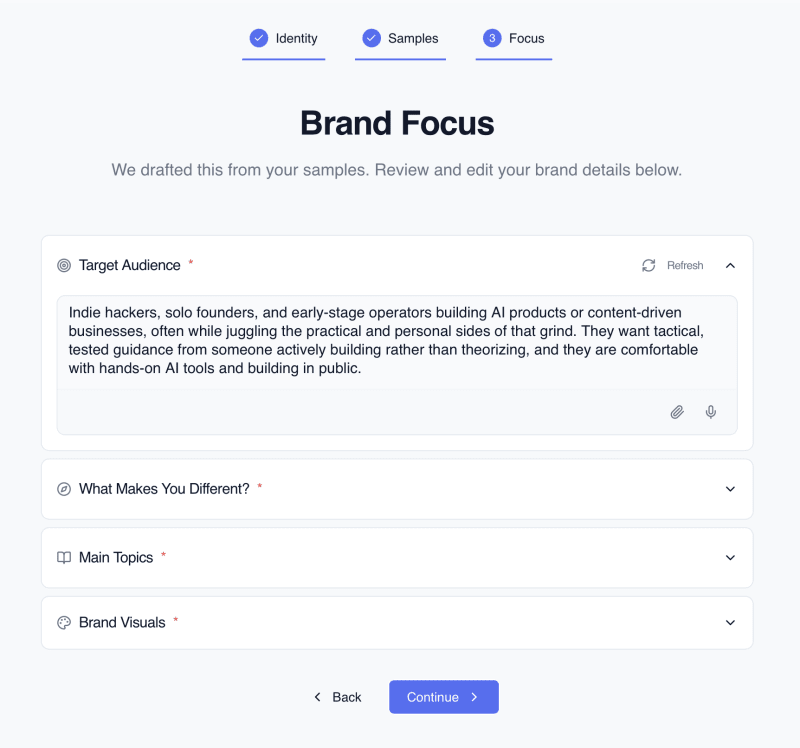
Most people hear "brand profile" and think it's just some settings page you fill out and forget. It's not. Flyletter's brand profile captures how you actually write. Your voice. Your style. Your formatting quirks. Your audience. Even your visual preferences.
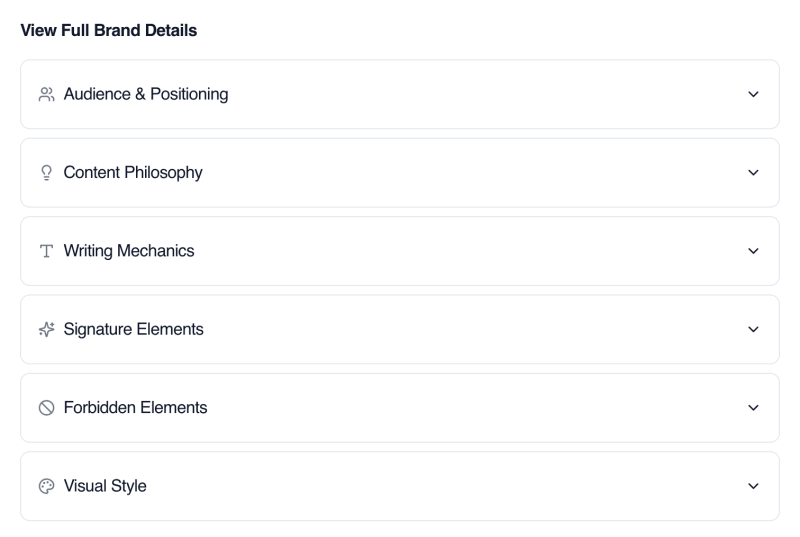
Flyletter builds your brand profile from your actual writing, not a questionnaire. Six components capture it:
- Audience focus: Who you write for.
- Brand positioning: What makes you different.
- Writing style: Measured from your samples. Sentence length, contraction rate, how often you ask questions. Numbers, not vibes.
- Signature elements: Your most recognizable moves, grounded in verbatim quotes from your published work.
- Forbidden elements: Words and patterns you never use, enforced at every writing stage.
- Visual style: Brand colors, mood, and imagery to match.
Each one is extracted from your published work, not self-reported.
Tone, sentence structure, vocabulary level, humor style, paragraph rhythm, how you use bold text, whether you lean on stories or frameworks or data. All of it.
That's the difference between "generic AI output" and content that actually sounds like you wrote it, and here's how to set one up in four steps:
The four-step brand profile setup
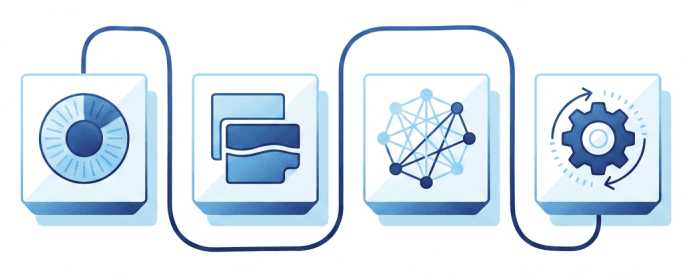
Step 1: Choose your brand type
When creating your brand profile, start by naming your brand and choosing what type it represents. Your brand name is the pen name you write your newsletter under. You can name it yourself, name it after your business, or any other pseudonym you write under:
- Personal: Your name, your voice, your perspective. This is for creators writing as themselves.
- Business: A company or product with its own distinct voice and identity.
- Hybrid: A personal brand tied to a business (think: founder-led newsletters where you're the face of the company).
Pick the one that fits. This choice shapes how Flyletter better understands your brand throughout the brand profile creation process.
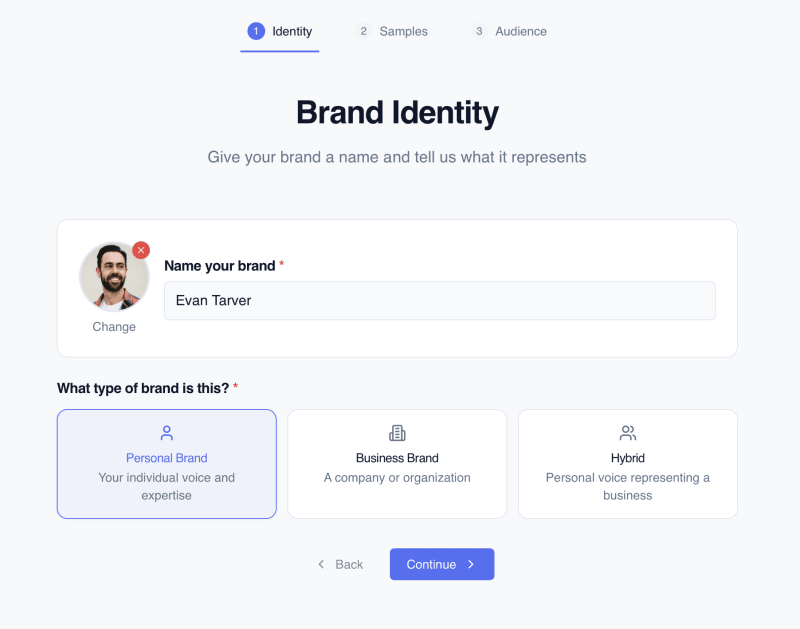
Step 2: Add your writing samples
Flyletter creates your entire brand profile from just three writing samples. You've got three ways to add them:
- Connect your newsletter: If your newsletter has a public URL or RSS feed, you can simply give Flyletter the URL and it will automatically pull your samples.
- Add samples manually: Don't have a public feed or want to add additional samples? Simply add them by pasting the URL, attaching files, or copy/pasting the content directly.
- Admired writers: Have writers you admire? Add their samples by pasting the URL, attaching files, or copy/pasting directly, and Flyletter will blend elements of their style with your authentic brand voice.
Choose samples that actually represent how you want your brand voice to sound. If you wrote a super formal white paper for a client but your newsletter voice is casual and direct, don't use the white paper. Pick pieces that feel like your brand on its best day.
And if your samples went through ChatGPT at some point, don't sweat it. Flyletter's extraction knows the AI tells and won't learn them as your voice.
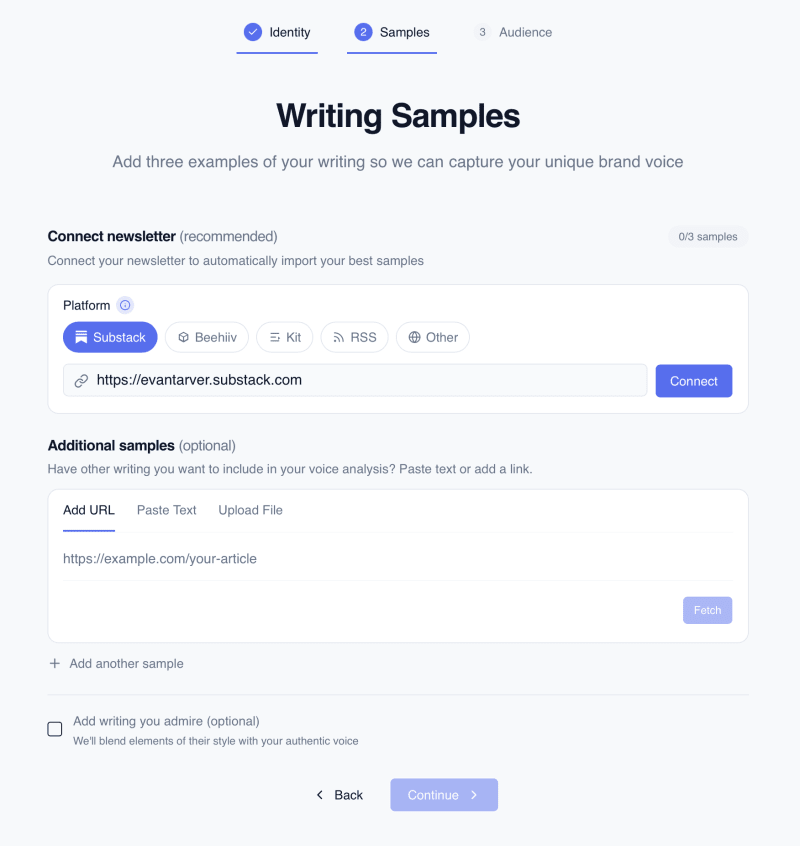
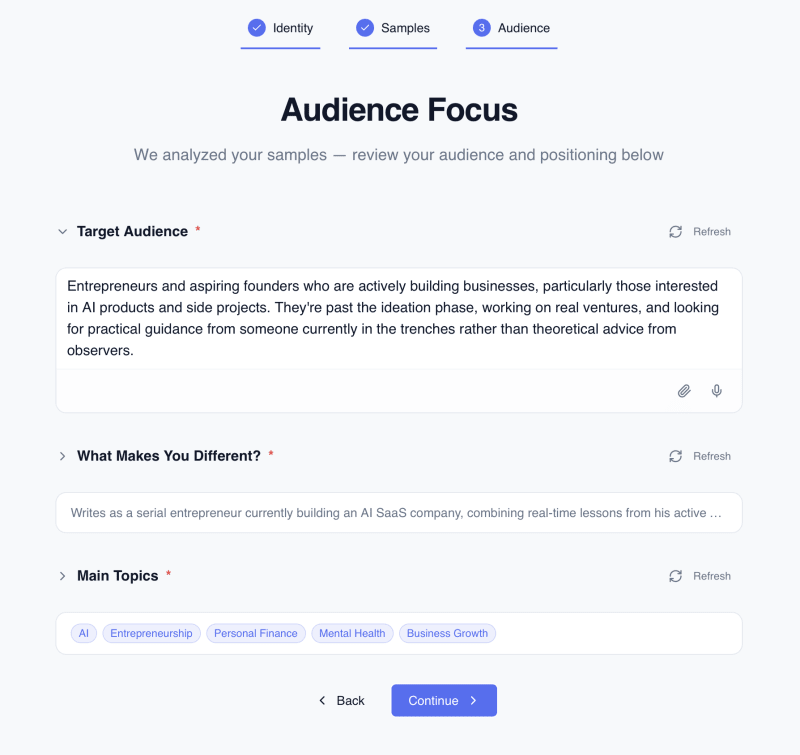
Step 3: Define your audience and approve
The last step in the creation process is the only time you need to actually approve anything. This is because Flyletter analyzes your writing samples to automatically define your:
- Target audience
- What makes you different
- The primary topics you write about
- Your visual style, based on example images
However, it's important to review, refine, and approve these four brand profile dimensions. If you don't, your brand profile may be writing for the wrong audience, or assuming the wrong unique differentiation that helps your brand stand out in a crowd.
So here's my advice: spend a few minutes on this, not 5 seconds. Be specific about who your reader is. Age range, experience level, what keeps them up at night. The more precise your audience definition, the tighter every draft lands.
Once you've reviewed everything, hit continue. Flyletter runs three agents in parallel to build your full brand profile.
Step 4: Review, test, and refine your voice
Congrats, your brand profile is built. Now you need to confirm it actually sounds like you.
Start by reading through the profile summary: your tone position, voice mix (storyteller, frameworker, opinionator, conversationalist, fact presenter), and key characteristics. If something feels off, you can edit any of it manually.
Then, test it. From the voice playground, generate a writing sample in your brand voice. Does it sound like your brand on its best day?
If you want to tweak it, there are two ways to refine:
- Chat with Flyletter directly: Type something like "make this a little more casual" or "I'm more opinionated than this." Flyletter will analyze your request, update your full brand profile, and generate a new sample for you to review.
- Make manual edits: Scroll through the full brand details (audience focus, brand positioning, writing style, signature elements, forbidden elements, and visual style) and tweak any data point yourself. Hit save when you're done.
Keep generating samples and making adjustments until it feels dialed in. Then, the real test: write your first newsletter draft using your brand profile and see how it performs in the wild.
Beyond setup: your profile gets smarter
The brand profile isn't a one-and-done thing. Two things keep it evolving:
- Automatic voice insights: As you write and edit newsletter drafts, Flyletter learns more about your brand and will provide automatic suggestions to improve your profile.
- Content source connections: Connect other content sources to your brand profile, like your YouTube channel, blog, and more. Flyletter will scan your live content to learn more about your brand and provide better suggestions over time.
Think of your brand profile as a living document that grows with you.
Start now
You now have a personalized AI writing assistant that understands your voice, learns from every piece you publish, and helps you write consistently on-brand content that actually stands out, even inside Claude.
But only if you set it up right.
Go build your brand profile. Pick your brand type, add three solid writing samples, define your audience, and approve. The whole thing takes minutes. The payoff compounds from there.
What are you waiting for?