Flyletter Use Cases: 12 Ways to Improve Your Newsletter Operations
Twelve use cases for Flyletter, from capturing a shower thought to shipping the issue and pulling a week of social posts out of it.

15 min read

Managing a newsletter requires five skills, and most tools only sell you one of them.
The whole process looks something like this: You have an idea for a newsletter issue and write it down before it evaporates. You mull it over until you have an angle that's worth someone's time. You write the newsletter draft, probably okay with "just good enough" because who has the time? You publish, and then scramble to reverse-engineer social media posts to promote it.
Many default to working with AI models like Claude or ChatGPT for help. But they're limited for this kind of multi-step workflow. And the AI copywriting tools available aren't purpose-built for newsletter operations.
Enter Flyletter.
It's an AI-powered newsletter platform that learns your brand voice from three writing samples, then runs a multi-agent content team that plans, researches, drafts, edits, and ships every issue. Creators use Flyletter to capture ideas, develop them into briefs, plan a content calendar, write newsletters in their own voice, automate publishing on a schedule, and turn every issue into social posts and images.
Flyletter is built to help creators, businesses, and newsletter operators manage the newsletter growth cycle, from ideation to publication and promotion. If you want the feature-by-feature breakdown instead, I covered every Flyletter feature and how it works separately, and the strategy and process behind all of it in the complete guide to AI newsletter writing.
There are many ways to use Flyletter to grow your newsletter while saving you time. Let's walk through all five stages of a typical newsletter process and the use cases for Flyletter across each.
The Stages Of Flyletter's Newsletter Lifecycle
The newsletter lifecycle runs in one direction. Ideas come in at one end, and a published issue plus a week of social posts comes out the other.
- Capture. Ideas arrive and get saved before they evaporate.
- Develop. Rough thoughts get shaped into briefs with an angle and a takeaway.
- Write. The agents draft and edit the issue in your voice.
- Automate. The scheduler runs the writing whether or not you're at your desk.
- Amplify. The finished issue becomes social posts, search traffic, and everything else you publish.
Twelve use cases sit across those five stages, and I built every one of them because I needed it myself.
Flyletter Use Cases
| Use case | What it does |
|---|---|
| 1. Get idea suggestions | Serves evergreen and timely (Google Trends) topic prompts in your Ideas area |
| 2. Capture ideas any way you want | Save ideas by typing, voice dictation, or file attachment |
| 3. Think an idea through | Thought Partner chat attached to every saved idea |
| 4. Turn a raw idea into a brief | Content Brief action structures angle, takeaway, and audience |
| 5. Pressure-test the angle | Devil's advocate, Explore angles, and Search the web actions |
| 6. Build your brand profile | Learns tone, rhythm, vocabulary, formatting, audience, positioning, visual style from three samples |
| 7. Draft in your own voice | Seven agents in relay produce a voice-accurate, illustrated draft |
| 8. Reuse content you already have | Turns a URL, video, or transcript into an issue in your voice |
| 9. Publish on a schedule | Auto-write runs server-side on a cloud scheduler |
| 10. Keep the queue honest | Saved ideas run first, suggestions are the fallback |
| 11. Turn issues into social posts | Publicist writes value posts and promotion posts for LinkedIn, X, Threads, and Substack Notes |
| 12. Write from Claude | MCP connector loads your voice into Claude in seconds |
Capture Stage: Stop Losing Ideas
Get Idea Suggestions When You Have None
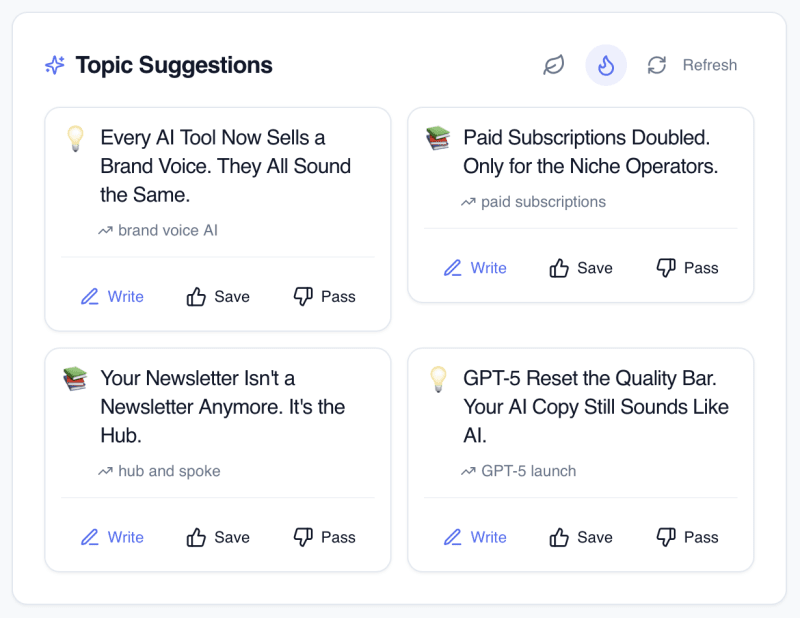
Idea suggestions gives you topic ideas in two flavors: evergreen ideas built from your brand profile and positioning, and timely ideas pulled from Google Trends. Evergreen suggestions are the ones that will still make sense in eighteen months, the foundational pieces your audience expects you to have written. Timely suggestions catch the thing your niche is arguing about this week.
You are not obligated to use any of them. Most weeks I don't. What they do is kill the blank-screen problem, which is the single most common reason a newsletter skips a send. Upvote and downvote suggestions to get refined topic ideas over time.
Capture Ideas By Typing, Talking, Or Dropping A File
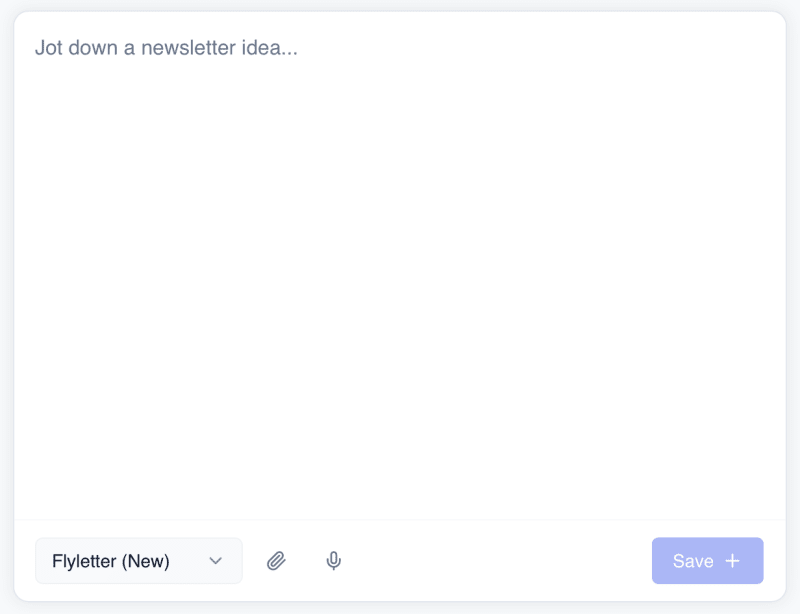
You can capture and save your own ideas in three ways: you type them, you dictate them with voice, or you attach a file.
Typing is for the idea that arrives fully formed. Voice dictation is for the idea that arrives while you're walking or driving and would otherwise be gone in four minutes. File attachment is for the raw material you already have sitting around: a transcript, a client email thread, a set of notes from a call, a document you half-wrote and abandoned.
When you save your idea, Flyletter not only captures it, but provides a summary you can use when developing it further.
Think An Idea Through Before You Commit To It
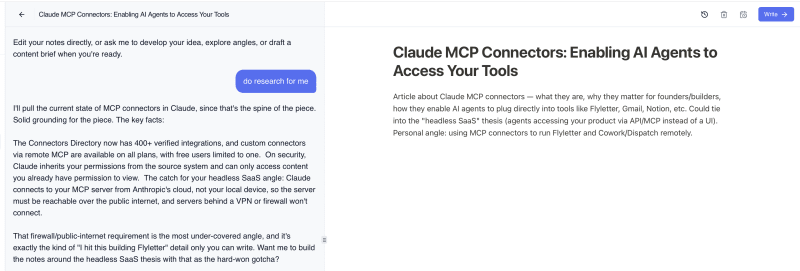
Every saved idea has a Thought Partner chat attached to it. It's a chat interface that already knows the idea, your brand profile, and your audience, so you skip the part where you re-explain yourself.
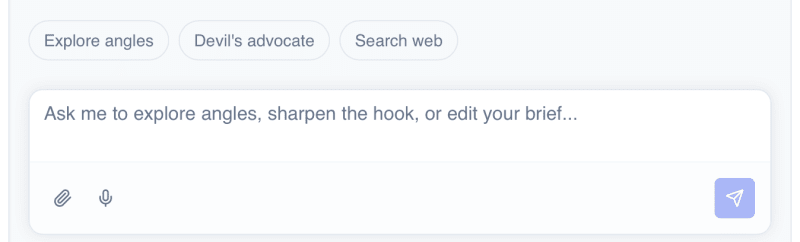
You can have a full-on conversation with the thought partner, and it can make edits to your saved idea directly, plus execute on four quick actions:
- Explore angles. Generates different ways into the same topic so you don't default to the most obvious one.
- Devil's advocate. Argues against your take and shows you where a smart reader pushes back.
- Search the web. Pulls in current context and sources on the topic.
- Content Brief. Turns the conversation into a structured brief the writing pipeline can run on.
The reason this lives on the idea and not in a separate window is that the thinking and the idea stay attached. Come back three weeks later and the reasoning is still there, waiting, instead of buried in chat history you'd have to go excavate.
Develop Stage: Turn Rough Ideas Into Briefs
Turn A Raw Idea Into A Structured Brief
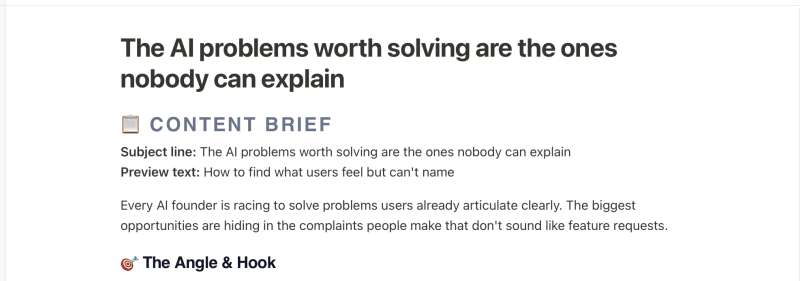
The Content Brief action takes a rough idea and produces a brief with an angle, a core takeaway, a target reader, and the points the piece needs to hit. That brief is what the writing agents read.
This is the step most people skip when writing with AI: the human in the loop. An AI writing from "write about newsletter growth" produces mush, because that isn't an instruction, it's a category. An AI writing from a brief that names the specific claim, the specific reader, and the specific takeaway produces something you can edit.
Consistency lives here more than anywhere else. When you have four developed briefs sitting in your Ideas area, publishing next Thursday is a simple task. When you have zero, publishing next Thursday is a decision you get to make at 6am on Thursday, and you know how that goes.
Pressure-Test The Angle Before You Draft
With the content brief created, you can have the Thought Partner play devil's advocate or explore alternative angles to ensure it is the strongest brief possible.
Run devil's advocate on a take you feel confident about and it will surface the objection your sharpest subscriber was already forming in their head. Then you answer it inside the piece instead of in your replies.
Explore angles does the opposite job. It widens the idea before you narrow it. One topic usually has four or five entry points, and the one you thought of first is often the one every other newsletter in your niche also thought of first.
Search the web fills in the third gap, which is context. Pull real sources into the brief at this stage and the draft arrives with them already woven in, instead of you bolting citations on afterward.
Write Stage: Seven Agents, One Voice
Build A Brand Profile That Every Agent Reads
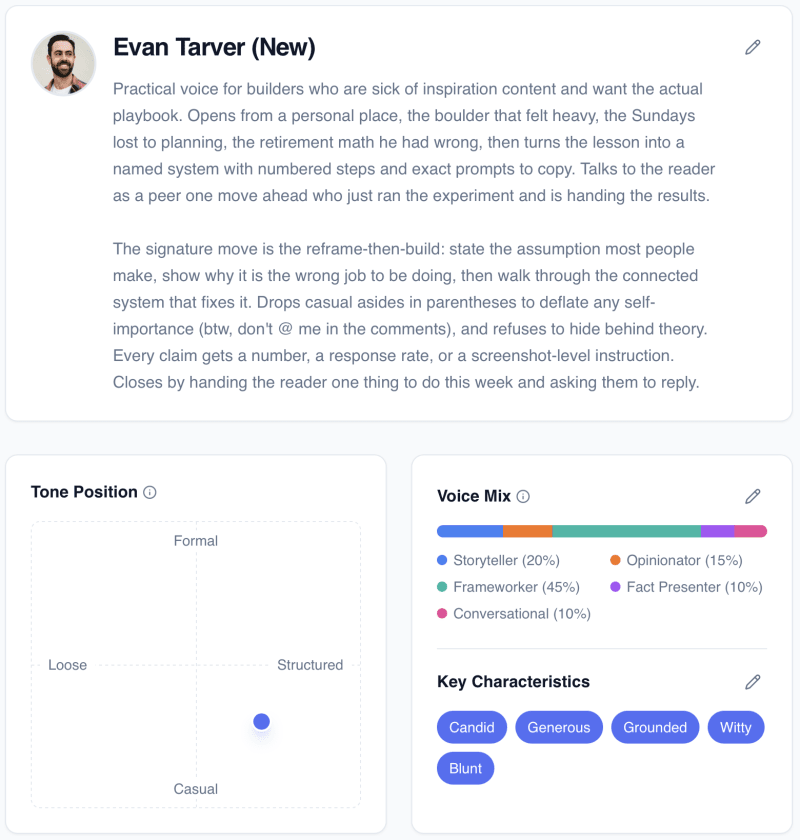
Your brand profile is what makes the output sound like you instead of like an AI impersonating you. Flyletter builds it from three writing samples, and it captures tone, rhythm, vocabulary, formatting habits, audience, positioning, and visual style.
The profile is a structured asset, not a paragraph of vibes stuffed into a prompt. Every agent in the pipeline reads it independently at the start of its own run, which is why the voice holds all the way through the piece instead of drifting into corporate register by the third section.
You can build and edit your own brand profile, and it will automatically suggest updates as you edit content based on your trends.
Draft A Full Issue With Seven Agents In Relay
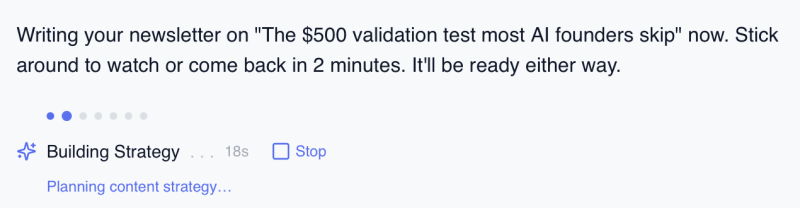
Seven specialized agents run one after another on the same draft: Strategist, Researcher, Architect, Writer, Editor, Illustrator, Publicist. Each one does a single job, then hands off.
The Strategist picks the angle and the takeaway. The Researcher gathers and verifies sources. The Architect builds the outline and decides what each section has to accomplish. The Writer drafts against that outline. The Editor cuts, tightens, and enforces the voice rules. The Illustrator produces images in your visual style. The Publicist prepares the social versions.
I built it this way because I tried the other way first, cramming every job into one long chat, and the voice fell apart the more instructions I added. Narrow jobs hold. Wide jobs drift. If you want to run it yourself, I walk through writing a newsletter that sounds like you in five steps separately.
Turn Content You Already Have Into An Issue
Not every issue starts from a blank idea. Some weeks the material already exists, just in the wrong shape. A webinar recording. A podcast episode. A long client email you wrote at 11pm that said the thing better than you've ever said it on purpose.
Give Flyletter the URL, the YouTube link, or the pasted text, and it runs the source through the pipeline as material rather than as a topic. The arguments and the examples survive. The delivery becomes yours.
I use this most for voice memos. Talking through an idea is faster than writing it, and the spoken version is usually looser and more honest than a first draft. Record it, paste the transcript, get back something structured enough to edit.
The trap is summarizing. A summary of your webinar is a recap nobody asked for. Repurposing works when the source supplies the thinking and your brand profile supplies the voice.
Automate Stage: Replace Willpower With Infrastructure
Publish On A Schedule Without Being At Your Desk
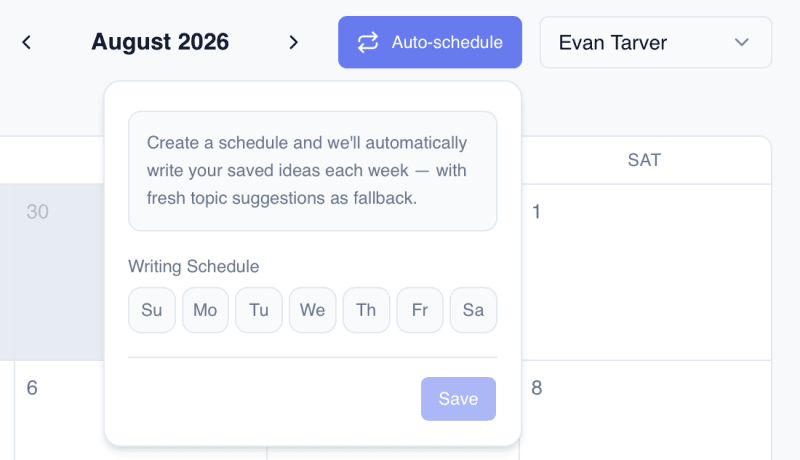
Auto-write is a cloud scheduler that automatically writes newsletter drafts on a set cadence. It runs server-side, which means your browser can be closed, your laptop can be shut, and you can be on a plane. The draft still gets written.
This is the use case that answers the consistency problem. Consistency is an infrastructure problem wearing a discipline costume. Every creator I've advised who fell off their schedule fell off during a busy week, not a lazy one. Willpower is the wrong thing to build a publishing habit on, because willpower is exactly what a busy week takes from you.
Move the trigger off yourself and onto a scheduler, and the busy week stops being a missed week.
Keep The Queue Honest
Auto-write runs your saved ideas first and falls back to suggestions only when the queue is empty. Your own thinking gets priority. The platform never quietly overrides an idea you developed with one it generated.
Finished drafts appear in your dashboard with a "Written!" badge so you can see at a glance what's waiting on you.
Auto-write produces drafts, not sends. Nothing publishes blind. You open it, you read it, you cut the paragraph that doesn't land, you add the story only you could tell, and then you ship. The scheduler removes the hardest part of consistency, which is starting. It does not remove your judgment, and you shouldn't want it to.
Amplify Stage: Make One Issue Do Five Jobs
Turn A Finished Issue Into Social Posts
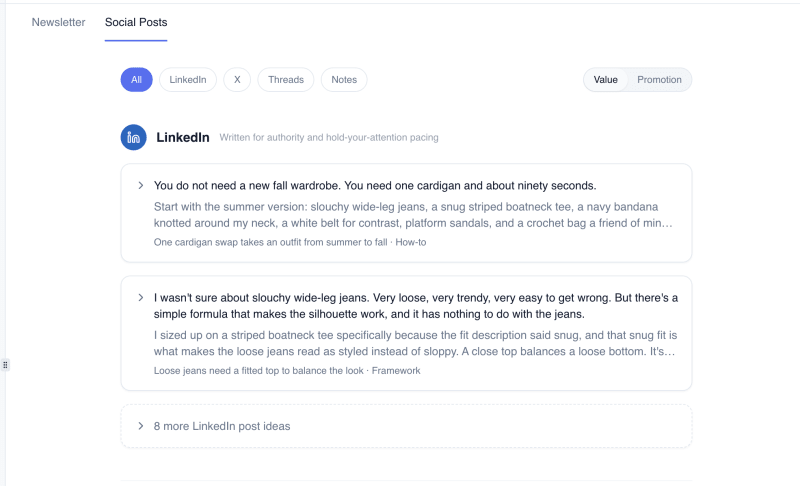
The Publicist takes your finished newsletter and writes the social versions for LinkedIn, X, Threads, and Substack Notes. It reads the same brand profile as the rest of the pipeline, so the posts sound like you on those platforms rather than like a summary bot.
It writes two kinds. Value posts stand alone and carry no links, built to earn attention from people who have never heard of you. Promotion posts run as a short campaign around the issue itself and carry the links back to it.
Most creators write the newsletter and stop. Then they wonder why growth is flat. The newsletter is the richest content you produce all week, and it dies in the inbox unless you push it back out.
Repurposing is the least glamorous growth lever available and one of the most reliable. Same idea, different container, new audience. A thread pulled from Thursday's issue reaches people who have never heard of you, and the only cost is a few minutes of editing what the Publicist already drafted.
Write From Claude With Your Voice Loaded
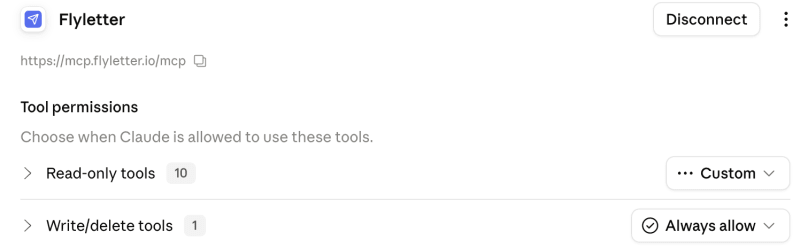
The Claude MCP connector links Flyletter to Claude in seconds. Once it's connected, Claude can read your brand profile and write in your voice, and you can save ideas straight into your Flyletter Ideas area from a Claude conversation.
That second half is the part I use most. Ideas rarely arrive while you're sitting in your newsletter tool. They arrive mid-conversation, while you're working through something unrelated. Being able to say "save this as an idea" without switching tabs is the difference between capturing it and losing it.
For writing, it means you're not choosing between the tool you already pay for and the voice profile that took you three samples to build. Your voice travels with you.
Keep Everything In One Place
Twelve use cases and one workspace. Your ideas, briefs, brand profile, drafts, images, social posts, and schedule all live in the same place and read from the same profile.
That sounds like a small thing next to seven agents and a cloud scheduler. It isn't. Most creator stacks are four tools that don't know about each other, which means you're the integration layer, hand-carrying context between them every single week. Collapse the stack and that job disappears.
One system. One voice. One place to look when you want to know what's shipping next.
Who Runs Their Newsletter This Way
The people using Flyletter like this are creators, consultants, solo operators, and business leaders. Typically, those whose personal and business brands are intertwined, and have big ticket offers with longer sales cycles. And, limited time.
They treat their newsletter as the hub and everything else as a spoke, automated by Flyletter, which is exactly the structure I laid out in the four-stage framework for newsletters that grow. The stages don't change based on your vertical. Only the content does.
Capture, develop, write, automate, amplify. Five stages, twelve use cases, one loop that starts with a shower thought and ends with a published issue and a week of social posts pulled out of it.
Start free, take one idea (the shower one, if you still remember it), and run it all the way through. Capture it, develop it, schedule it, let the pipeline draft it, publish it, amplify it. One idea, one full lap. Then ask yourself what your current process has done for you lately.