Flyletter vs ChatGPT vs Claude: Which Should Write Your Newsletter?
ChatGPT and Claude are the best general assistants ever built. Flyletter is a newsletter system built on Claude. An honest comparison of voice, features, and cost.

10 min read

ChatGPT and Claude are the best general assistants ever built, but they're not purpose-built to write newsletters in your brand voice. The reason is two-fold:
First, getting ChatGPT or Claude to write in your voice requires an accurate brand voice profile and writing examples that the models never forget. The second is that writing a good newsletter draft isn't a single role -- it is the output of an entire content team handling strategy, research, outline writing, editing, image creation, and more.
Recreating this yourself in a Claude project or custom GPT requires you to build a JSON brand voice profile that measures the differences in your writing voice vs model defaults, store it in a way the AI chats never forget, connect a repository of your writing samples, and then run a multi-agent prompt chain that is liable to confuse the model and cause it to drift.
Claude and ChatGPT are amazing tools. In fact, Flyletter is built on Claude. But they fall short when writing newsletters and the other content necessary for a newsletter flywheel in your brand voice. If you're weighing tools beyond these three, the best AI tools for newsletter writing compares all the top AI tools for newsletter writing.
Quick Verdict: When to Use Each for Newsletter Writing
These cases cover nearly everyone reading this:
- You write a newsletter occasionally. Stay with ChatGPT or Claude. Learning and paying for a new tool is more trouble than it's worth.
- You enjoy building your own prompts and AI processes. Flyletter simulates an entire content team but is rigid for those wanting to build their own workflows.
- You have trouble publishing consistently. Go with Flyletter and take advantage of the topic suggestions and overnight auto-write schedules so you always wake up with a fresh draft to review on your set schedule.
- Your newsletter has to sound like you every time. This is the case Flyletter was built for. Voice consistency across many issues is an architecture problem that Flyletter solves with an accurate brand profile and role-specific content agents that never forget it.
- You already live inside Claude all day. Run both. Flyletter connects to Claude through the Flyletter MCP connector, so the two work together instead of competing for the same job.
What Each Tool Actually Is: Flyletter vs ChatGPT vs Claude
I built Flyletter because I spent months prompting ChatGPT and Claude to help write my newsletter, and it took longer than just writing it myself.
I would open a chat, paste my voice notes, include last week's issue, explain the audience, outline the structure, call out the AI patterns to voice, and then spend the next few hours rewriting the draft into something I would actually send. By the time it was clean, I'd spent more time editing than just writing it myself.
Turns out, Claude and ChatGPT are great general models, but when you need them to follow a series of role-specific tasks while never deviating from instructions like a brand voice profile, the models tend to drift. The workflow isn't built to support niche use cases like AI newsletter writing.
So I built Flyletter: A niche-specific AI newsletter writing platform that drafts every issue in your brand voice, plus social posts to promote it and topic suggestions so you never run out of things to write about.
Flyletter creates a complete brand voice profile from just three writing samples, measuring the differences in your writing style vs model defaults, so it always sounds like you.
From there, a series of role specific agents follow a three-tier architecture that includes universal writing guidelines, your unique brand profile, and instructions on how to read and apply it to their task. This way, the agents never drift.
Flyletter's Brand Voice Profile vs Claude or ChatGPT
Flyletter compiles a brand voice profile from just three writing samples that includes your tone, key voice characteristics, brand positioning, writing style, signature and forbidden elements, and visual style.
This isn't a style guide, or a drop-down of pre-selected tones like "professional." Flyletter reads your samples and extracts what is measurably true about how you write: mean sentence length and variance, contraction rate, question rate, second-person density, your recurring structural moves, and your never-said words.
The output is a set of JSON persona slices that deliver only what is absolutely necessary for each agent to understand about your brand voice to complete their role-specific task. This way, the persona is injected into each agent on each run so it never forgets it, and it isn't overloaded with information it doesn't need.
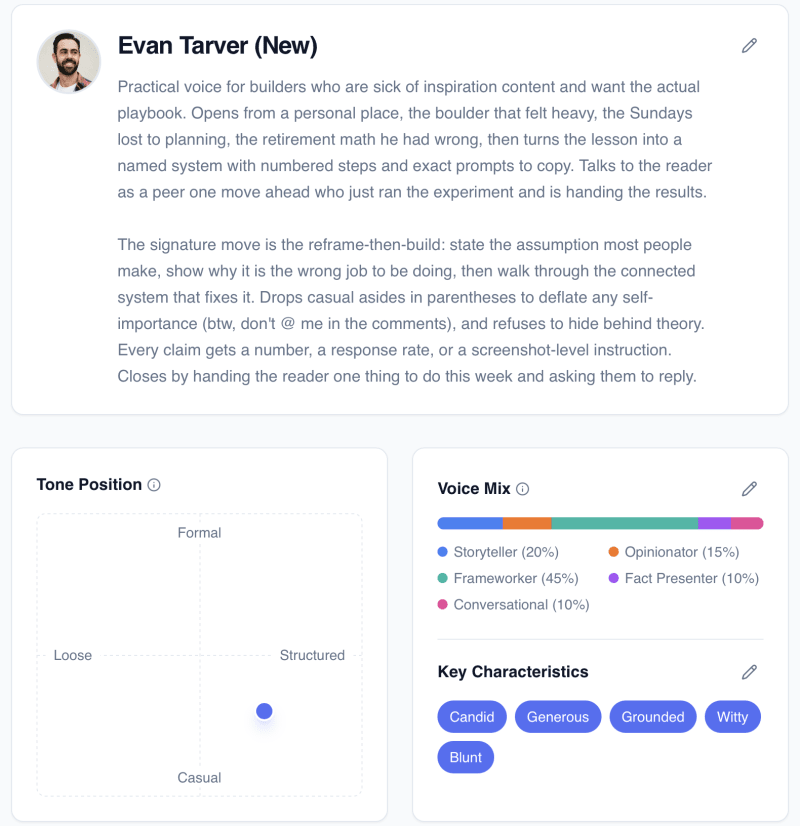
To do this in ChatGPT or Claude, you'd first have to create a brand profile extraction prompt or skill, feed it your samples, have it output a JSON file, add that JSON file to a project, and then write instructions on how the model actually reads the file.
It's just too cumbersome, and the model is likely to forget and drift from your writing voice. Flyletter's AI content team never drifts.
Flyletter's Multi-agent Pipeline vs ChatGPT or Claude
With your brand voice created from your samples, Flyletter runs a multi-agent newsletter pipeline to actually write your draft. Each agent runs in sequence, passing its output and the decisions behind the output to the next agent like a relay.
The reason for this is accuracy declines the more instructions you give a model, and that AI is bad at following multiple instructions at once. When using ChatGPT or Claude to write a newsletter draft with multiple roles and instructions, the output degrades.
That's why Flyletter breaks down drafting a newsletter into narrow tasks in a sequential pipeline, where each agent is given only the necessary information it needs to succeed.
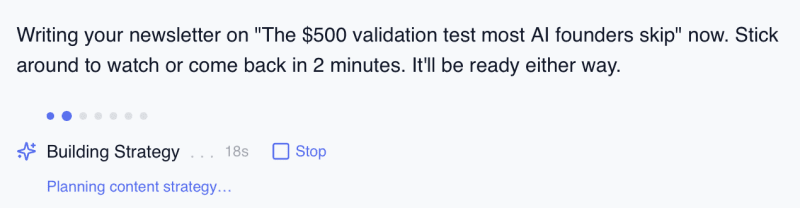
Before the agents run, the Planner step turns your raw idea, link, or half-sentence into a structured prompt the rest of the pipeline can read, so no downstream agent has to guess what you meant.
Strategist. Decides the angle, the core takeaway, and the audience, without simultaneously trying to write sentences that sound like you.
Researcher. Finds and verifies sources with URLs, a job a drafting chat quietly skips when it is also managing tone and structure.
Architect. Builds the outline and assigns each section a role in the argument, which is the job a single chat abandons first once it starts producing prose.
Writer. Drafts section by section against the brand profile, holding voice as its only real constraint instead of one of forty.
Editor. Checks the assembled draft against the writing standards and the profile, a review pass no chat performs on its own output because it has no separate reviewer.
Illustrator. Generates the featured and inline imagery so visual work never competes with the drafting window.
Publicist. Repurposes the finished issue into social posts, which is the job that never happens when the drafting session ends at "send."
Pricing & Other Features: Flyletter vs Claude vs ChatGPT
| Tool | Free | Paid entry tier |
|---|---|---|
| ChatGPT | Yes, limited usage | Plus at $20/mo |
| Claude | Yes, limited usage | Pro at $20/mo, includes Claude Code |
| Flyletter | Yes, three full newsletters, no credit card | Creator, roughly $3 per newsletter including that issue's social posts |
Above $20, both general assistants offer roughly $100 and $200 individual tiers. Those buy more usage of the same general assistant with higher limits (and in Claude's case, unlocks Fable), which is genuinely worth it if you run heavy sessions all day. They do not buy a newsletter-specific system, because that is not what they are for. Every Flyletter feature and how it works lays out what that system includes.
Capture Topic Ideas & Get Suggestions
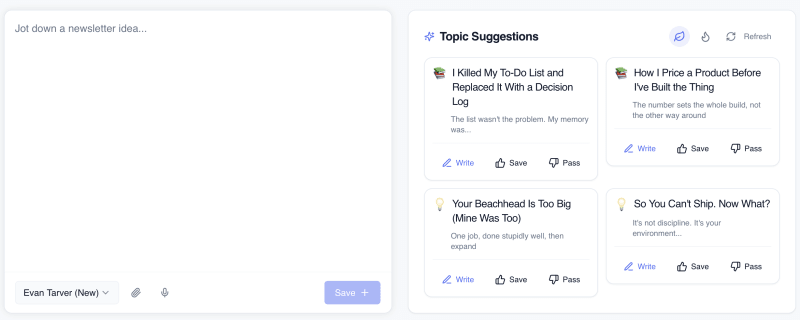
One operational cost of chat-based drafting is deciding what to write at all. Flyletter keeps an idea board you can dump your thoughts into and develop with a dedicated thought partner, plus topic suggestions with upvote/downvote controls that learn your preferences over time. By the time publish day arrives, the queue already has something in it.
Claude and Flyletter, Connected
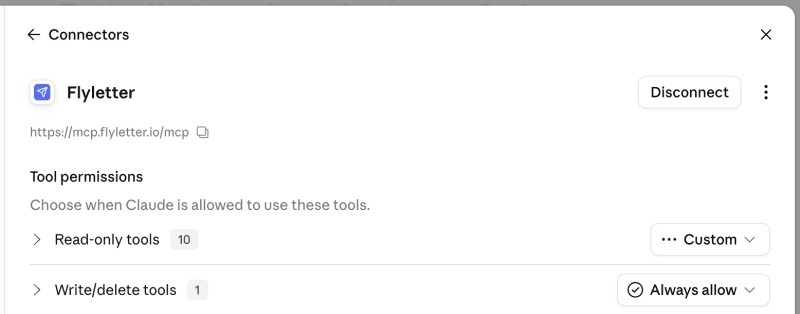
Claude users can connect Flyletter directly to their Claude account via an MCP connector, letting you use your brand voice within a Claude chat as well as saving newsletter topic ideas from inside a Claude conversation without leaving it. Claude stays your thinking space. Flyletter stays the production line. There is no equivalent connector for ChatGPT.
Flyletter vs ChatGPT vs Claude: Side by Side
| Criteria | ChatGPT | Claude | Flyletter |
|---|---|---|---|
| Voice consistency | Strong in-session, drifts across sessions unless rebuilt | Strongest raw prose quality, still drifts across sessions | Profile measured from three samples, enforced at every stage |
| Setup effort | Minutes, or longer for a custom GPT | Minutes, or longer for a Project | One-time profile build from your writing samples |
| Per-issue effort | Prompting, steering, and rewriting each session | Prompting, steering, and rewriting each session | Submit a topic, review the draft |
| Research (sourced) | Web search, sources vary by session | Web search, sources vary by session | Dedicated research agent, verified URLs required |
| Social repurposing | Possible if you prompt for it | Possible if you prompt for it | Publicist agent runs on every issue |
| Idea management | Chat history and saved threads | Projects and saved threads | Idea board plus topic suggestions with voting |
| Images | Native image generation, best of the three | No native image generation | Illustrator agent, newsletter imagery only |
| Automation | Tasks and scheduled prompts | Limited native scheduling | Built for a recurring publishing cadence |
| Flexibility (scope) | Very high, general assistant across every task | Very high, especially long documents and code | Narrow by design, newsletters only |
| Price | $20/mo entry | $20/mo entry | Free for three issues, roughly $3/newsletter after |
Bottom Line: When to Use Flyletter
The occasional writer. You send a newsletter when you have something to say, maybe once a month, and you genuinely like prompting. Stay with ChatGPT or Claude.
The weekly publisher. You ship on a schedule and it has to sound like you every single time. That's the job Flyletter was built for.
The Claude power user. You live in Claude all day and don't want to leave. Run both. The MCP connector makes this an "and," not an "or."