Never Run Out of Newsletter Topics to Write About
Most newsletter ideas die in the notes app graveyard. Flyletter's Ideas feature generates topic suggestions and captures your shower thoughts before they vanish.

4 min read

You've had the idea. The perfect newsletter topic, hitting you mid-shower or halfway through a workout. Crystal clear. You know it's good.
And then it's gone.
By the time you're toweled off and back at your desk, you're staring at a blank screen trying to remember what felt so brilliant five minutes ago. Maybe you jotted something in your notes app, but let's be honest, that note joins a graveyard of half-thoughts you'll never open again.
I know this because I am this person. I'm the kind who gets their best ideas at the worst times, and loses almost all of them. And then when I actually needed a topic to write about? Nothing came.
So I built something to fix it.
AI topic suggestions: ideas on demand
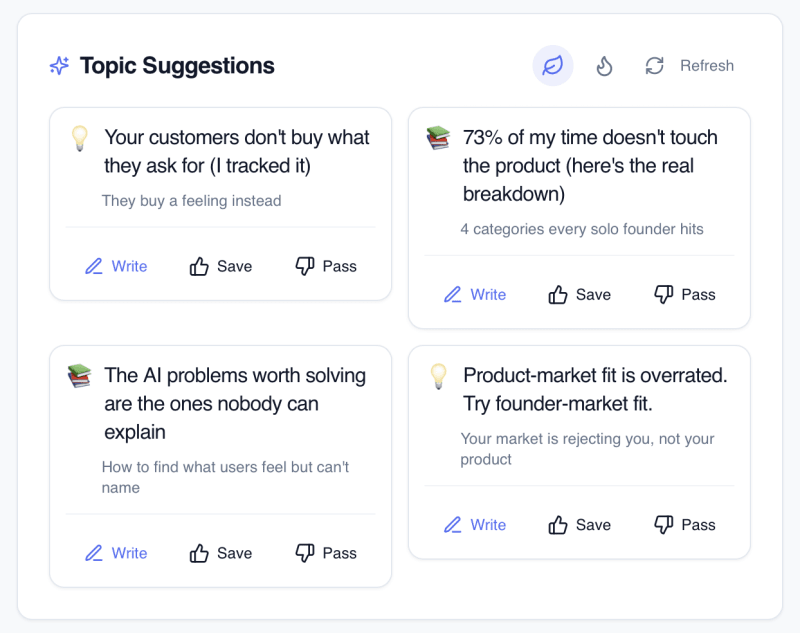
Flyletter's Ideas feature attacks newsletter topic ideas from two angles. The first: you don't even need to come up with the idea yourself.
Flyletter generates topic suggestions based on your niche, audience, unique differentiator, and connected content sources in your brand profile.
There are two types of suggestions:
- Evergreen topics based on your niche and what your audience consistently engages with
- Timely topics powered by Google Trends data, so you're writing about what people are actively searching for right now
Flyletter learns about your brand over time to provide even better suggestions. Connecting content sources like a YouTube channel or blog to your brand profile gives Flyletter more context for ideas. Upvoting and downvoting topics refines Flyletter's suggestions.
Custom idea capture: chat, save, and develop
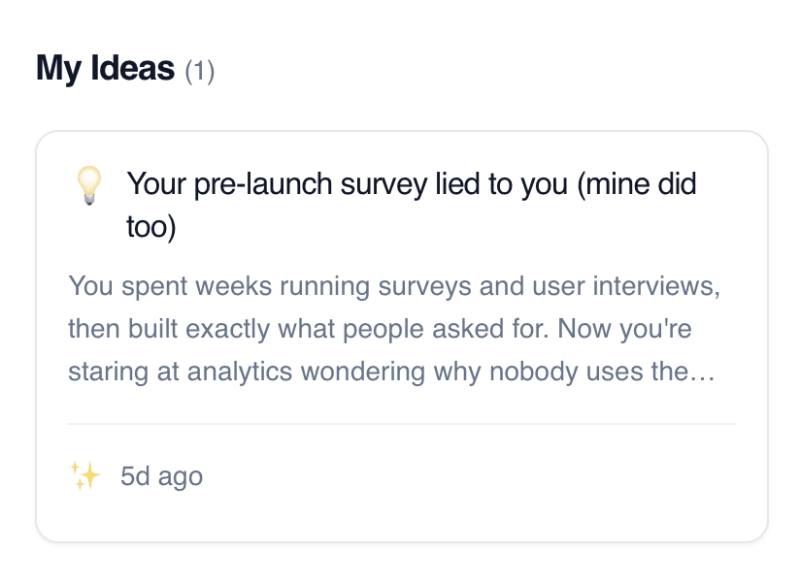
The second angle is my favorite. With Flyletter, you can save ideas as you have them simply by chatting, even from a Claude conversation. Flyletter will catalog the idea, provide a summary, and even gives you the opportunity to develop it further with the Thought Partner (more on that in a sec).
I love this feature because what I do is I have a tab open on my phone. Whenever I have an idea, I'll pull out my phone, capture the idea, and save it to be written later (something you can do automatically with the auto-write feature).
That's it. No opening a notes app that becomes a black hole. No texting yourself and forgetting to check. You capture it, Flyletter saves it, and the idea lives somewhere it'll actually get used.
You've got a few ways to capture an idea:
- Voice dictation for when you're running, driving, or mid-shower (waterproof phone case hopefully)
- Quick typing for when you can jot something down fast
- File attachments for screenshots, images, or reference materials that sparked the idea
Next time you have a newsletter topic idea, resist the urge to use your notes app. Use Flyletter instead, you'll thank me later.
From rough thought to full content brief
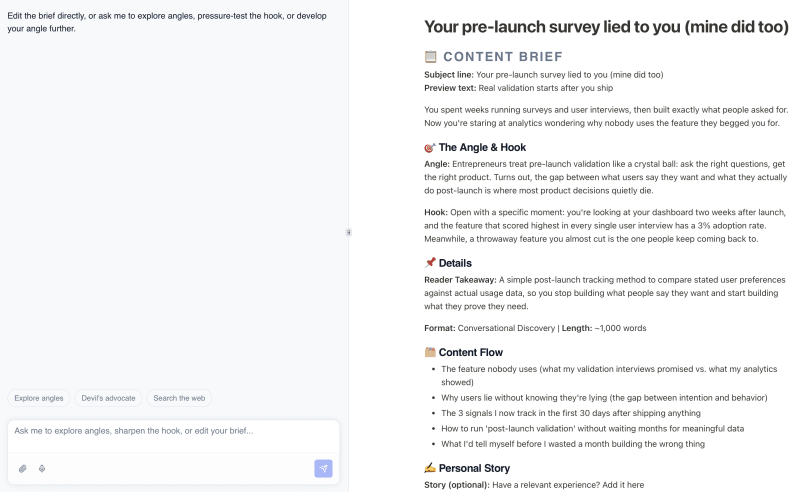
Okay, so you've identified an idea. Now what?
This is where most systems stop, and where Flyletter keeps going. Once you have a topic you like, Flyletter's Thought Partner can help you turn that thought into a real concept just by chatting with it:
- Research expansion that adds relevant context and data to your initial spark
- Refinement suggestions that strengthen your core argument
- Structure recommendations based on what works for your content style
- Source suggestions for credibility
Once you've developed the idea, have the Thought Partner create a content brief that feeds directly into Flyletter's newsletter writing pipeline.
Stop losing your best work
Every week, you're losing ideas that could've been your best newsletter. Not because you're forgetful. Because your system wasn't built to catch them.
That changes now.
Open Flyletter, capture that idea you had this morning (you know the one), and let the system do the rest. Your best content shouldn't live and die in a shower thought.
Once you have a topic, here's how to write a newsletter that sounds like you, and the complete guide to AI newsletter writing covers everything after that.
Start capturing today. Never lose another idea again.